
AI and MCP
Run your agency from Claude or ChatGPT.
SparkDesk has a first-party MCP server. Connect it to the assistant you already use, and ask it to log time, chase stale deals, draft invoices from hours and record payments, all inside your own permissions.
MCP and the REST API are free on every plan.
Draft an invoice for Halcyon Health from their unbilled hours this month.
invoice_generate_from_hoursaccount: "Halcyon Health", from: "2026-10-01", to: "2026-10-31"22.0 unbilled hours found. Draft INV-2026-0004 created.
I found 22.0 unbilled hours for Halcyon Health in October and created draft invoice INV-2026-0004 using the layout and terms from their last invoice. It is a draft, so nothing has been sent. Want me to add the stock photography licences as a line item before you review it?
In plain language
What MCP is, and why it matters for a client business.
MCP (Model Context Protocol) is a standard way for AI assistants to use other software. Instead of copying data into a chat, the assistant calls tools that the software publishes: search records, start a timer, create an invoice.
Most tools that agencies run on publish nothing, or only cover contacts and deals. SparkDesk publishes the whole client record: the pipeline, the project, the hours, the invoices and the payments. That means your assistant can do real operational work, not just look things up.
As of October 2026, HoneyBook, Dubsado, Bonsai and Productive do not offer a first-party MCP server, and CRM-focused tools such as Attio cover CRM data only.
Setup
Connected in three steps.
1
Copy your connector link
In SparkDesk, open Settings > Integrations > API Keys > Connected apps. The MCP server URL for your workspace is shown there.
2
Add it to your assistant
In Claude, ChatGPT or any MCP client, add a custom connector and paste the link. You are sent to SparkDesk to sign in and approve. There is no API key to copy.
3
Pick the workspace
Choose which organization the connection works in. From then on, your assistant acts as you, with your role and permissions.
Manage or disconnect connections any time from Connected apps. Full details in the API & MCP Reference.
What you can ask
Real requests, mapped to real tools.
About 60 tools by default, across CRM, projects, timers, invoices, transactions, forms, Flows, custom objects, reports and admin settings. Client and project names below are illustrative.
Pipeline and clients
"Find every opportunity in Proposal stage with no activity in 14 days and list the owners."
record_search"Convert the lead from this morning's form into an account and contact."
lead_convert"What do we know about Harbor & Co? Open invoices, active projects, last emails."
search_globalrecord_get
Time and projects
"Start a timer on the homepage copy task for the Fieldstone project."
timer_start"Stop my timer. The first draft just went to the client."
timer_stop"Create the onboarding tasks for the new retainer from our usual list."
record_create
Invoices and money
"Draft an invoice for Fieldstone from their unbilled hours in September."
invoice_generate_from_hours"Invoice 1042 was paid by bank transfer today. Record it."
invoice_record_payment"Which transactions still need review, and are there likely duplicates?"
transaction_needs_reviewtransaction_find_duplicates
Reports, Flows and admin
"Run the revenue by client report for last quarter and summarize the top five."
report_run"Clip the monthly retainer billing Flow to the Fieldstone account."
flow_clip_create"Add a required Industry picklist to accounts with these six values."
customfield_createpicklist_set
Permissions
Your assistant can never do more than you can.
- Runs as you
- An OAuth connection uses your exact role and permissions, including record visibility.
- Admin tools stay admin
- Settings and key management tools return a permission error for everyone else.
- Every request logged
- Tool, person, record, status and duration, in the API & MCP Activity report.
- Safe by design
- Every tool is marked read-only, destructive or idempotent, and deleted records go to trash where they can be restored.
Orbit, built in
Platform AI or your own key.
Orbit is the assistant inside SparkDesk. It summarizes records, answers questions about your data, scores leads and enriches accounts. Run it on SparkDesk's AI with a monthly allowance, or connect your own OpenAI, Anthropic or Google key from Solo up. Requests on your own key are not counted.
Need more platform AI? The Platform AI pack adds 1,000 requests/month for $25/month.
How AI allowances work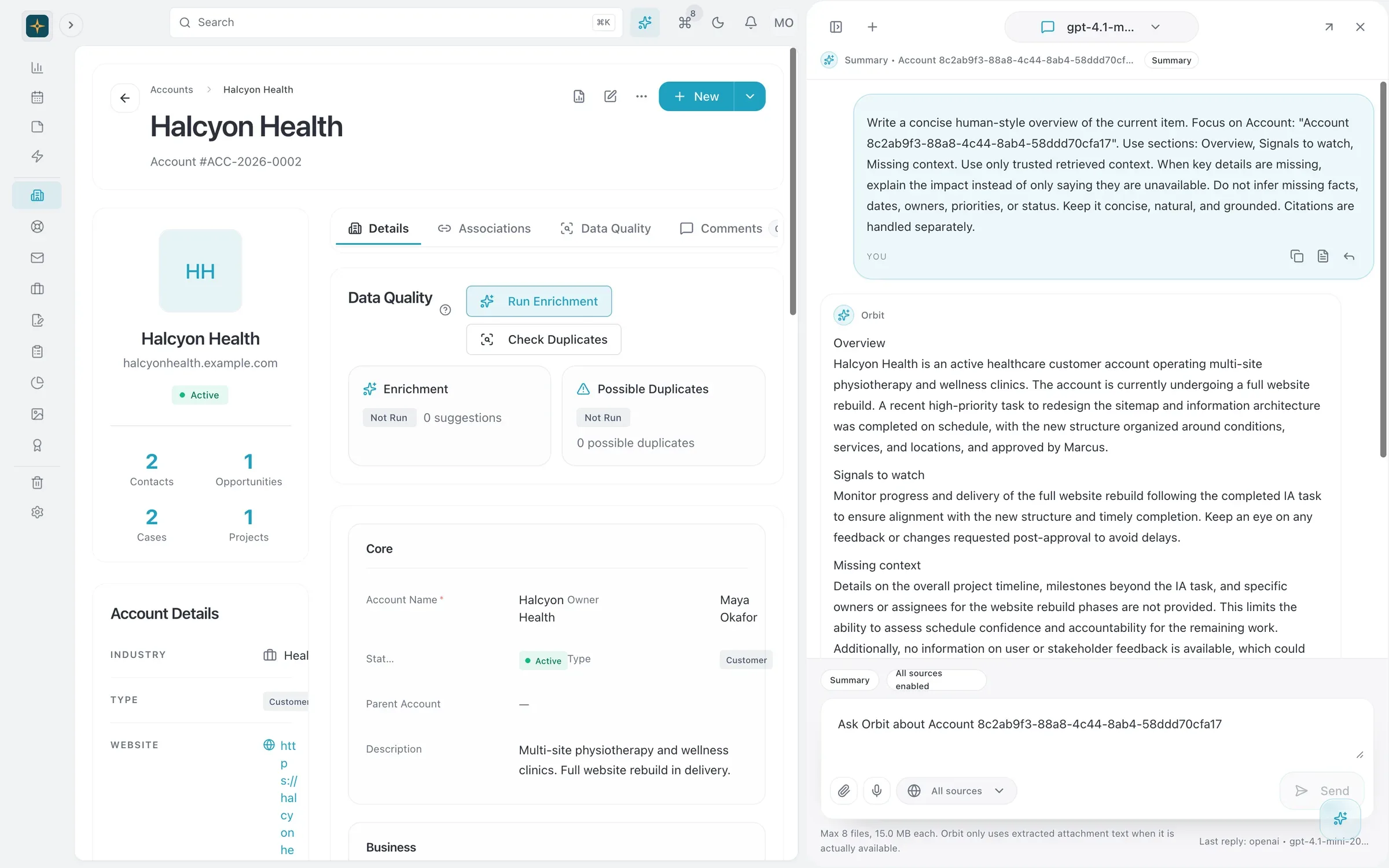
- Account summary
- Open invoices
- Suggested next step
| Plan | Platform AI requests | Your own AI key | MCP and API |
|---|---|---|---|
| Free | 25/month | Not included | Included |
| Solo | 200/month | Free, unlimited | Included |
| Team | 1,000/month | Free, unlimited | Included |
| Business | 5,000/month | Free, unlimited | Included |
AI and MCP: questions
Something else? Ask us.
Does the MCP server cost extra?
No. The MCP server and REST API are included on every plan, including Free. Requests from your assistant count against your normal plan limits, such as records and Flow runs, not a separate AI fee.
Can the assistant see things I cannot?
No. An OAuth connection runs as you, with your exact role and permissions. Admin-only tools return a permission error for non-admins, and records hidden from you by visibility roles stay hidden.
Can I see what the assistant did?
Yes. Every API and MCP request, including errors, is recorded with the tool, the person, the record and the result. Admins see the whole organization in the API & MCP Activity report; everyone else sees their own.
Which AI assistants work?
Any client that supports MCP custom connectors, including Claude and ChatGPT. Clients that cannot sign in with OAuth can connect with a personal API key instead.
What is the difference between Orbit and the MCP server?
Orbit is the assistant built into SparkDesk, available on every page. The MCP server lets the assistant you already use, like Claude or ChatGPT, work with SparkDesk from outside the app. You can use both.
Is my data used to train AI models?
Platform AI requests are sent to the AI providers listed on our subprocessors page to produce the answer. If you bring your own key, requests go to your provider under your own agreement with them.
Read more: Using Claude with your CRM through MCP, API and MCP, Permissions and security.
Give your assistant a job at your agency.
Start a 14-day free trial of any paid plan. No card needed, and you can drop to the Free plan at any time.