

Client portal
Stop emailing PDFs. Give clients one link to everything.
Clients sign in with a magic link and see their open invoices, shared documents, project status and requests in one place. It all comes from the records your team already works in, so it stays current.
Available on Solo and above, with extra client users available as an add-on.
Contracts › Statement of work: Brand refresh
Statement of work: Brand refresh
PublishedCTR-0318 · Harbor & Pine Coffee · Owned by Priya Shah
Contract value
$24,000.00
Effective
Nov 2, 2026
Expires
Apr 30, 2027
Versions
2
Approvals
Request ApprovalApproval Steps
Maya Chen
Step 1 · Client approver
"Looks great, approved."
Requested by Priya Shah on Oct 23, 2026
Harbor & Pine Coffee
Welcome to your client portal
Track work, review documents, follow invoices, and stay aligned without email back-and-forth.
Waiting on you 2
Statement of work: Brand refresh Approve
Approval · Review contract approval · Requested Oct 23
Invoice INV-2048 To pay
Invoice · Due Nov 7, 2026$7,200.00
Projects 1View all
Brand refresh and websiteActive
Progress12%
Approvals
1 pending · 1 ready for youNothing pending · 0 ready for you
Statement of work: Brand refresh Pending
document approval
Review contract approval · Created Oct 23, 2026
You are all caught up
New approval requests appear here.
Approval updated
- On their phone, the client opens the Fernhill Studio client portal, where "Waiting on you" lists the "Statement of work: Brand refresh" approval.
- They open Approvals, choose Approve, add a note and confirm.
- The portal confirms the approval and the item leaves the pending list.
- On the desktop, the contract's approval step shows Approved with the client's note.
The problem
Sound familiar?
- Clients ask for the same invoice PDF three times.
- Project updates are scattered across email threads nobody can find.
- Approvals happen in reply-all chains and nobody knows which version was agreed.
How it works
How clients use it
1
Invite the client
Add client contacts as portal users. They sign in with a magic link sent to their email, with no password to remember.
2
Share the work
Invoices, documents and project status appear from the same records your team uses every day.
3
Take requests
Clients raise requests and reply to service cases from the portal, so the conversation stays on the record.
4
Approve and sign
Clients review approvals and sign contracts you send through the portal.
In the app
The real screen
Captured from a demo workspace, not a mock-up.
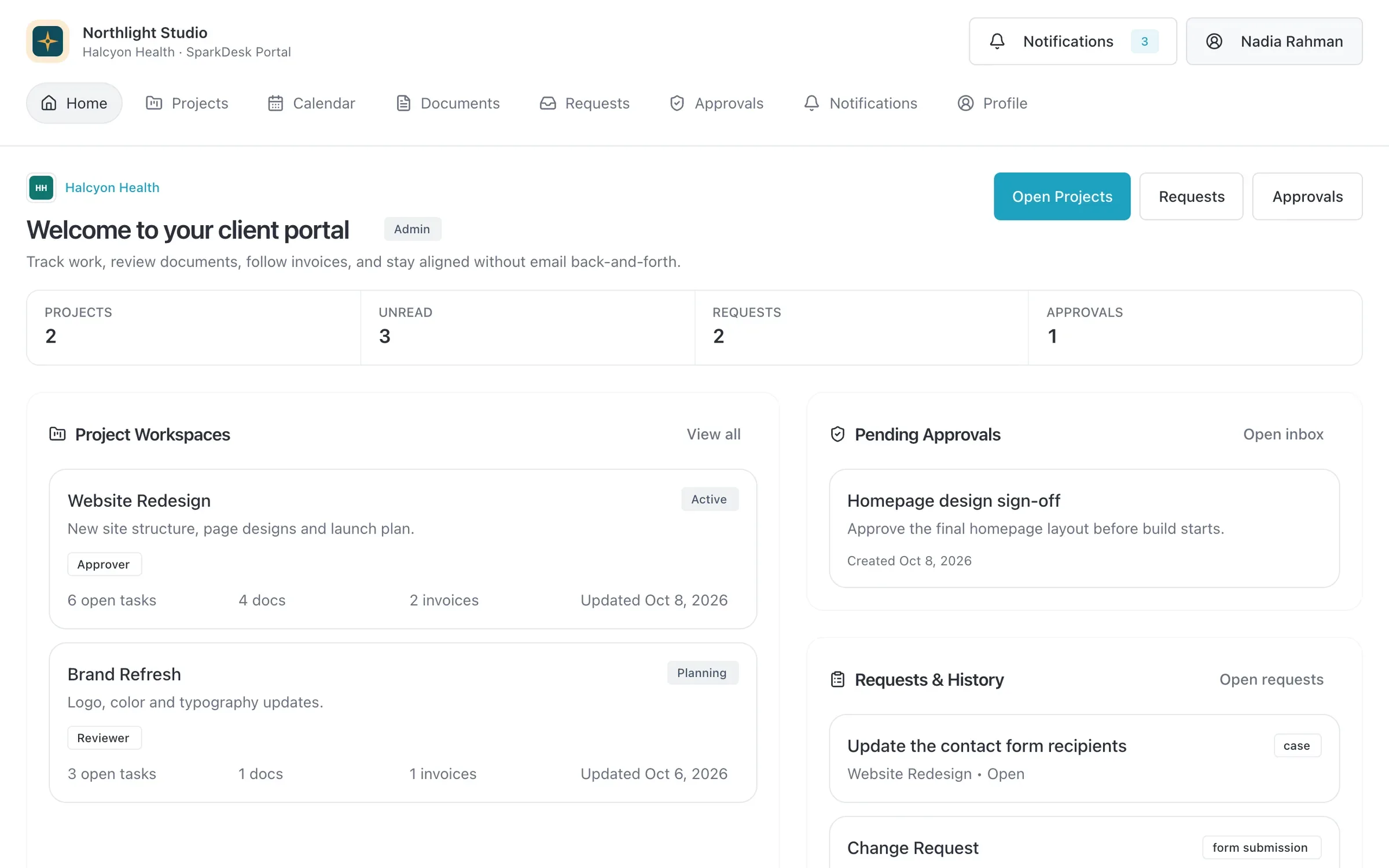
- Project workspaces
- Pending approvals
- Requests and history
What you get
- Magic-link sign-in
- Clients get a sign-in link by email. No passwords to reset and no accounts for you to manage by hand.
- Invoices and PDFs
- Clients see their invoices and download the PDFs. With Pay online turned on, the invoice link and email let them pay by card or bank debit.
- Requests and case replies
- Requests and service case replies from the portal land on the client's record, where your team already works.
- Knowledge base
- With the service desk on Team and above, publish knowledge base articles clients can read in the portal.
- Preview before clients see it
- Preview the portal and knowledge base articles as a client will see them before anything goes live.
- No seat cost for clients
- Portal users never take a paid seat. Solo includes 10 client users, Team 100 and Business 1,000.
Read the documentation
Works with
Quotes and invoicing
Quotes that become deposit, progress and final invoices, invoicing from hours, online payments and automatic reminders.
Learn moreService desk
Email-to-case, SLAs, priorities and a knowledge base, linked to the client's account and projects.
Learn moreContracts and e-signature
Contract templates, a clause library and version history, with e-signature and an audit certificate built in.
Learn more
Used by: agencies, creative studios, event planners
Compare: vs HoneyBook, vs Dubsado, vs Productive, vs Pipedrive
Client portal: questions
Something else? Ask us.
Can clients pay invoices online?
Yes, when you connect your own Stripe account and turn on Pay online. Clients pay from the invoice link or the invoice email, and the payment is recorded on the invoice. In the portal they can view and download every invoice.
Do client users count as paid seats?
No. Client portal users never take a paid seat. Each plan includes a number of client users, and you can add more in packs of 100.
Do clients need a password?
No. Clients sign in with a magic link sent to their email address.
Can I check what a client will see?
Yes. Preview the client portal and knowledge base articles before clients see them.
Run your next client project in SparkDesk.
Start a 14-day free trial of any paid plan. No card needed, and you can drop to the Free plan at any time.