
Contracts and e-signature
Write the contract and get it signed in the same place
Draft from your templates and clauses, fill in client details from the record, then send it for signature without a separate e-sign tool. The signed PDF and audit certificate stay on the contract.
Included on every plan, including Free; contract approvals start on Team.
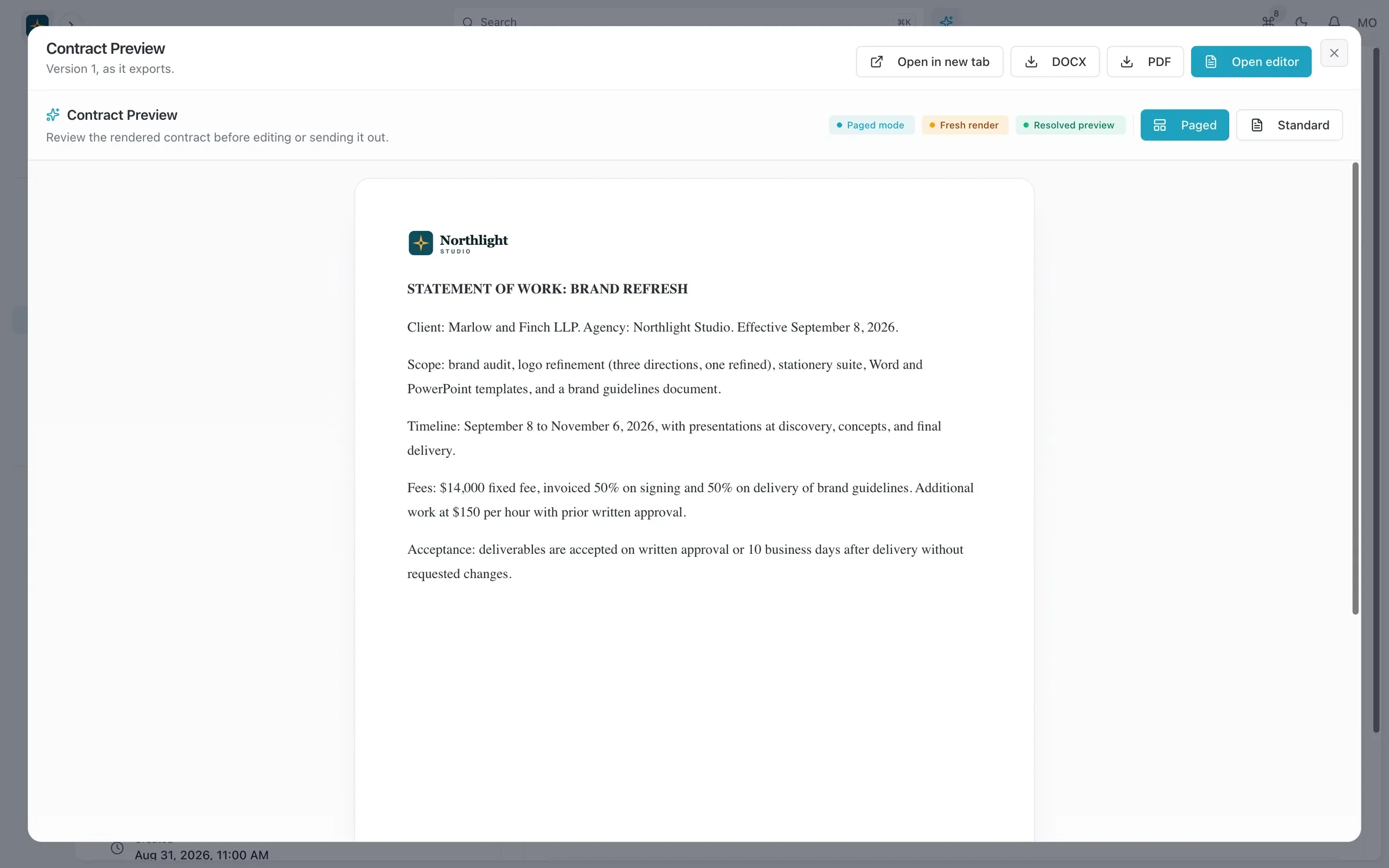
- Your letterhead and logo
- Export to PDF or DOCX
- Version and status
The problem
Sound familiar?
- We pay for a separate e-sign tool just to get our standard agreement signed.
- Someone always edits an old version of the contract.
- I have to dig through email to show when the client actually signed.
How it works
From draft to signed
1
Start from a template
Contract templates with tag placeholders pull the client, project and amounts from the record. Insert approved clauses from your library.
2
Review the versions
Each change is saved as a version. Compare two versions side by side before you publish.
3
Set up signing
Assign people to signing roles, set the signing order and a sign-by date, then send by email or through the client portal.
4
Keep the record
When every signer is done, generate the signed PDF and the audit certificate. Both stay attached to the contract.
What you get
- Clause library
- Save the clauses you reuse, such as payment terms or ownership of work, and drop them into any contract.
- Version history with a diff
- See exactly what changed between versions, so nobody signs a draft by mistake.
- Signing order and deadlines
- Signers go in the order you set, and signing links expire at the sign-by date you choose.
- Your branding
- Branding profiles set the logo, header, footer and styles, so contracts look like they came from your studio.
- Export to PDF or Word
- Export any contract as a PDF or DOCX file for your lawyer or the client's procurement team.
- Linked to the deal
- Contracts sit on the account and opportunity, next to the quote and the project they cover.
Read the documentation
Works with
Quotes and invoicing
Quotes that become deposit, progress and final invoices, plus invoicing from hours and credit notes.
Learn moreCRM
Accounts, contacts, leads and a deal pipeline that carry straight into quotes, projects and invoices.
Learn moreClient portal
A portal where clients sign in with an email link to see invoices, documents, projects and requests.
Learn more
Used by: consultancies, creative studios, event planners
Compare: vs Productive, vs HubSpot, vs monday.com, vs Notion
Contracts and e-signature: questions
Something else? Ask us.
Do I still need a separate e-signature tool?
No. E-signature is built in. You choose the signers, signing order and sign-by date, and SparkDesk produces the signed PDF and an audit certificate.
How do clients sign?
Signers get their request by email, or you can deliver it through the client portal if you use one. They sign the stored PDF of the contract version you published.
Can I see what changed between drafts?
Yes. Every contract keeps a version history, and you can compare any two versions side by side.
Is an e-signature valid for my agreements?
SparkDesk keeps the signed PDF and an audit certificate for each signing. Whether e-signature suits a particular agreement depends on where you work, so check with your lawyer for anything unusual.
Run your next client project in SparkDesk.
Start a 14-day free trial of any paid plan. No card needed, and you can drop to the Free plan at any time.